Plugins That Knock – KNOCK Plugin AU/VST3/AAX

Original price was: $119.00.$50.00Current price is: $50.00.
ℹ️ New to ReverBay? Learn how it works →
KNOCK Plugin by Plugins That Knock — 5-module drum enhancer by DECAP with punch, saturation, sub, air & clip. AU/VST3/AAX.
KNOCK Plugin by Plugins That Knock — Drum Processing Built Around Real Results
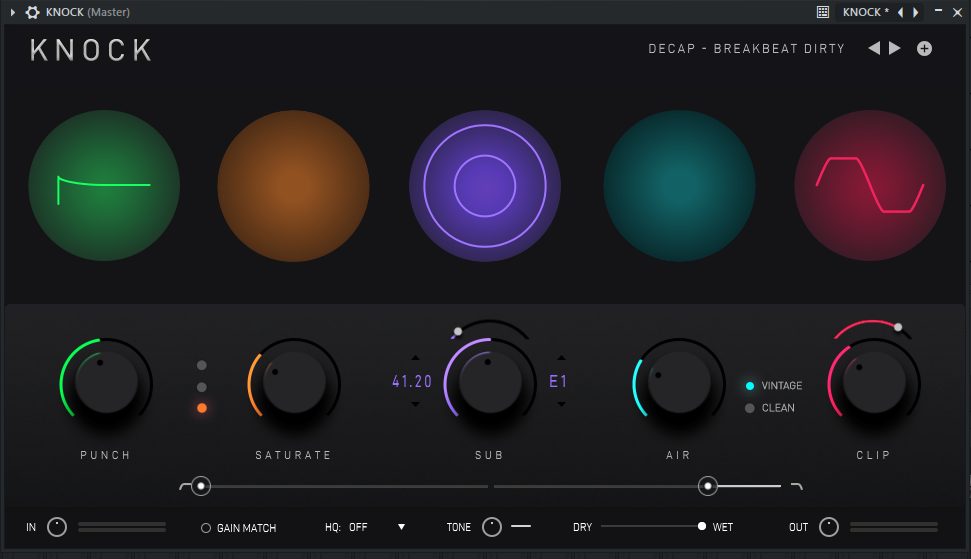
The KNOCK Plugin by Plugins That Knock came out of a specific need: platinum producer DECAP wanted a single plugin that replicated his drum processing chain without requiring producers to stack a dozen individual tools. The result is a focused drum enhancer with five processing modules — each one doing exactly what its name says, nothing more complicated than that.
If your drums sound flat, buried, or just not quite there, this is the kind of plugin worth reaching for first.
KNOCK Plugin — Five Processing Modules
- PUNCH — Transient shaper that adds attack and definition. Works on individual hits and full drum loops. Keeps the rhythm section tight without over-processing.
- SATURATE — Three modes: Soft, Medium, and Hard. Adds analog-style harmonic content to 808s, kicks, and loops. Intelligent gain compensation keeps perceived loudness consistent.
- SUB — Detects kick presence and generates tuned sub-bass tones. You select the pitch to match your track’s key. Adds depth to any kick — especially useful for 808s, breakbeats, and boom-bap production.
- AIR — Smooth high-end presence in Vintage or Clean mode. Adds clarity and sheen without introducing harshness.
- CLIP — Hard and soft clipper with adjustable settings. Hard mode for aggressive edge, soft mode for warmth and controlled saturation.
KNOCK Plugin — Why the SUB Module Stands Out
Most drum plugins add saturation and transient shaping. The SUB module is what makes KNOCK different. Rather than just boosting low frequencies with an EQ, the SUB section actually detects when your kick is hitting and generates a tuned sub tone at a pitch you select. The result is a clean, controlled sub-bass layer that tracks your kick pattern without muddying the mix.
For trap and hip-hop producers, this is the kind of tool that addresses a real problem: getting the 808 and kick to coexist without sacrificing low-end power on either one. Load KNOCK on the kick channel, tune the SUB to your root key, and the relationship between the kick and bass becomes much easier to manage.
Built by DECAP — What That Actually Means
DECAP is behind the Drums That Knock series — one of the most recognized drum sample packs in hip-hop production. The KNOCK Plugin extends that philosophy into a processing tool: the same thinking that made those samples sound right applies here. The factory presets ship with settings DECAP actually uses, which means they’re a genuinely useful starting point rather than demo patches that get replaced immediately.
🛒 Get KNOCK Plugin by Plugins That Knock
5 Modules · Created by DECAP · Low CPU · AU / VST3 / AAX
Why Producers Keep Using KNOCK
Low CPU footprint means you can stack it across kick, snare, and hi-hat channels without watching your performance meter spike. The interface is straightforward enough that you’re not spending session time learning the plugin. And because each module works independently, you can use just PUNCH and AIR on a hi-hat loop, or the full chain on a kick that needs everything.
It also ships with factory presets designed by DECAP — a drum producer who clearly thought about how these modules interact, not just how each one behaves in isolation.
Browse more drum processing plugins at ReverBay, or visit Plugins That Knock’s official site for audio demos.
System Requirements
| Mac (AU/VST3/AAX) | Windows (VST3/AAX) | |
| OS | macOS 11+ (M1/M2/M3) | Windows 8.1 / 10 / 11 |
| CPU | Intel i5/i7/i9 or Apple Silicon | Intel i5/i7/i9 or AMD Quad Core |
| RAM | 8 GB (16 GB recommended) | 8 GB (16 GB recommended) |
| Disk | 500 MB | 500 MB |
Frequently Asked Questions
Can I use KNOCK Plugin on a full drum loop, not just individual hits?
Yes. The PUNCH module works effectively on both individual drum hits and full stereo loops. The SUB module works best on a kick-heavy signal where it can detect the kick transient accurately.
Does KNOCK work in Logic Pro on Apple Silicon?
Yes. It supports the AU format and is compatible with macOS 11 and above, including M1, M2, and M3 machines.
How do I tune the SUB module to my song key?
The SUB section includes a pitch selector. Choose the root note of your track and the SUB generates a tone at that frequency, synchronized to your kick hits.
Is there a difference between the SATURATE modes?
Yes. Soft mode adds subtle harmonic warmth with minimal audible distortion. Medium adds noticeable analog character. Hard mode applies heavier saturation with more obvious tonal color — useful for aggressive or distorted drum sounds.
Related products

VST Plug-ins
VST Plug-ins
VST Plug-ins
VST Plug-ins

VST Plug-ins

VST Plug-ins
VST Plug-ins