

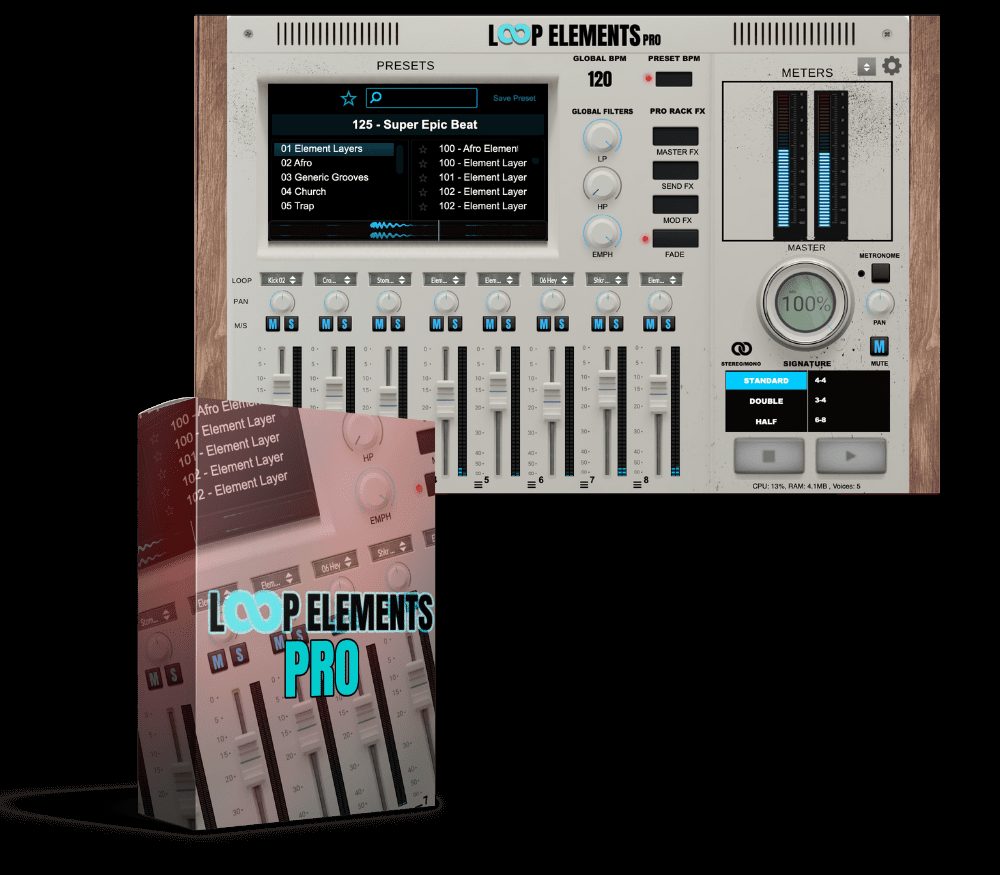
Loop Elements Pro VST/AU Plug-in
Original price was: $199.99.$89.00Current price is: $89.00.
ℹ️ New to ReverBay? Learn how it works →
Loop Elements Pro VST is a standalone and DAW plugin by Gospel Producers, built on 12 years of development. Load up to 8 loops simultaneously, shape each with dedicated FX, and perform live or in studio with VST3, AU, and AAX support for Mac and Windows.
Loop Elements Pro VST is a loop instrument plugin and standalone app by Gospel Producers, built for Windows and macOS. Twelve years of development went into it — and that history shows. The plugin brings together the entire Loop Elements Vol. 1–3 and Deluxe library, a built-in 8-channel mixer, per-channel effects processing, and over 400 presets. Whether you open it as a standalone app before a Sunday service or load it into your DAW mid-session, it’s ready to go in seconds.
What’s New in Loop Elements Pro VST Version 1.5
Version 1.5 landed as the biggest update since launch. Gospel Producers added 75+ new samples, including the new Smack Claps collection, plus 150+ new presets — pushing the total library past 400. The headline addition is Setlist Mode, which lets you pre-load up to 12 loops and switch between them instantly during a live set. Each loop stores its own Scene, so the mix you built in rehearsal comes back exactly as you left it. The update also brings Scenes for mute groups, MIDI-triggered pattern switching, Fader Linking for grouping channels together, and a Random Preset button for when you just want to explore.
Loop Elements Pro VST — Core Features
Standalone Loop Plugin — No DAW Required
Most musicians don’t want to open Ableton or Logic just to run a loop during a live set. Loop Elements Pro VST solves that by running as a fully standalone app — no host needed. On macOS it also runs as VST3 or AU inside any major DAW. Windows users have standalone support right now, with full VST3 plugin support on the way. Gospel Producers is currently building AAX support for Pro Tools.
8-Channel Loop Mixer
The mixer lets you stack and blend up to 8 loops running at the same time. Each channel is independent, so you can pull the kick loop down, push the pad up, and mute the percussion entirely — all without stopping playback. Fader Linking, added in v1.5, groups multiple channels under one control when you need to move things together fast.
Per-Channel FX and Pro-Rack Suite
Every channel has its own effects chain: EQ, compression, reverb, delay, and modulation. You sculpt each loop separately without routing anything out to a third-party plugin. The global Pro-Rack FX suite handles the master bus — one window controls everything from individual loops to the final output.
Vari-8 FX Module
Loops that repeat without changing quickly drain the energy out of a performance. The Vari-8 module works against that — it nudges your loops with small rhythmic and textural shifts so the same four bars never land exactly the same way twice. For church musicians and electronic producers running 45-minute sets, that difference is audible.
Loop Elements Pro: 400+ Presets and Royalty-Free Library
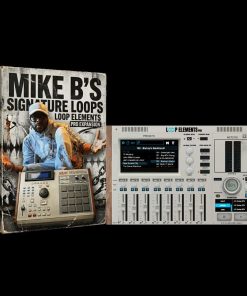
Loop Elements Pro ships with over 400 presets sorted by genre, mood, and tempo — so if you need a slow gospel groove at 68 BPM, you’re not scrolling blind. The full Vol. 1–3 and Deluxe content comes included, and every loop clears for commercial release with no additional licensing. To go deeper, the Mike B’s Signature Loops expansion adds over 50 loops recorded directly from Mikel Bereal’s MPC2000XL.
BPM Controls, Tap Tempo and MIDI Integration
Version 1.2 added global BPM controls with +/– buttons, a Tap Tempo button, and full MIDI controller support — including the Korg nanoKONTROL2. Built-in keyboard shortcuts cover navigation, loop swapping, and triggering, so your hands stay on the keys instead of the mouse. For live performers, that kind of speed matters when a song changes without warning.
System Requirements
Mac: macOS 10.12 or later — Intel or Apple Silicon (M1/M2 native) — 2.2 GHz dual-core, 4 GB RAM — VST3, AU, or AAX-supporting DAW (AAX requires Pro Tools 12+)
Windows: Windows 10 64-bit or later — 2.2 GHz Intel/AMD dual-core, 4 GB RAM — VST3-supporting DAW
Screen: 1280 x 1024 minimum
Formats: Standalone, VST3, AU (macOS) — Standalone (Windows, VST3 coming soon)
Who Uses Loop Elements Pro VST
Church musicians make up a large part of the user base — the plugin is fast enough to pull a usable loop in under a minute, which matters when worship sets change on the fly. Studio producers use it to sketch ideas quickly without building a full session. Live performers run it as their main loop source on stage, where reliability is non-negotiable. For more context on how loop-based instruments fit into modern production, Sound On Sound breaks it down well. You can also learn more from the developer at the official Gospel Producers product page. Browse the full VST plug-ins section at ReverBay for similar tools.
Click Add to Cart or Buy Now above. Your license and download link arrive by email as soon as the order goes through.
Frequently Asked Questions
Does Loop Elements Pro VST work on Windows?
Yes. The standalone version runs on Windows 10 64-bit or later right now. Full VST3 plugin support for Windows DAWs is in development and arriving soon. If you work on Windows and need the plugin inside a DAW today, check the Gospel Producers website for the latest update on the release timeline.
Does it work with Pro Tools and AAX?
Not yet as a native AAX plugin, but Gospel Producers is actively building that support. In the meantime, the standalone app runs independently on the same machine while Pro Tools handles your session alongside it. Most users on Pro Tools run it this way without issues.
Do I need a DAW to use Loop Elements Pro?
No. The standalone app runs on its own without any DAW installed. This is one of the most-used features among church musicians and live performers who just need reliable loops on a laptop without the overhead of a full production environment.
Is Loop Elements Pro compatible with Apple Silicon Macs?
Yes, fully. Loop Elements Pro runs natively on M1 and M2 Macs without Rosetta. It supports macOS 10.12 or later, and Apple Silicon machines are fully tested and officially supported.
Are the loops royalty-free for commercial use?
Yes. Every loop included in Loop Elements Pro — across the Vol. 1–3, Deluxe, and all expansion content — is cleared for commercial release. You can use them on streaming platforms, sync placements, album releases, and live performances without paying additional licensing fees.
What DAWs does Loop Elements Pro VST support?
On macOS, it loads as VST3 or AU in any major DAW — Ableton Live, Logic Pro, Studio One, Cubase, FL Studio, and others. It is compatible with every DAW except Pro Tools, where native AAX support is still in development. The standalone version works alongside any DAW on both Mac and Windows.
How many loops can I run at the same time?
Up to 8 loops simultaneously through the 8-channel mixer. Each runs independently with its own fader, mute, and effects chain. With Fader Linking you can group channels and move them together, which is particularly useful when you’re managing a full live set.
Can I use my own loops or only the included library?
Loop Elements Pro uses its own curated library of professionally recorded loops. The preset system lets you build and save custom combinations, and the Vari-8 module introduces real-time variation. Expansion packs like Mike B’s Signature Loops add new content to the library over time.
What is Setlist Mode?
Setlist Mode, introduced in version 1.5, lets you pre-load up to 12 loops and organize them in performance order before a show. Each slot saves its own Scene — the specific mix, mute states, and FX settings you configured — so switching between songs mid-set takes one click and brings everything back exactly as you set it up in rehearsal.
Does Loop Elements Pro receive updates after purchase?
Yes. Gospel Producers has updated the plugin from launch through versions 1.2 and 1.5, each adding significant new features at no extra charge to existing owners.
Related products

VST Plug-ins

VST Plug-ins
VST Plug-ins
Sound Loops & Samples

VST Plug-ins
Bundle Deals
VST Plug-ins

VST Plug-ins