

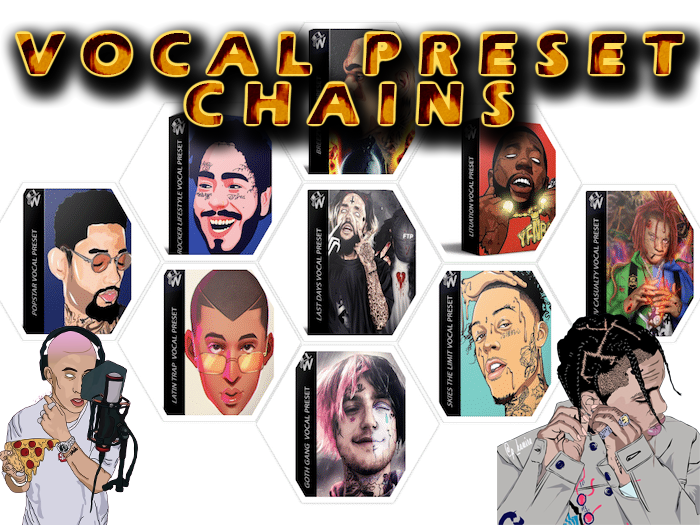
WavMonopoly Vocal Chain Presets Pack VOCAL PRESET CHAIN Pack FL STUDIO & LOGIC X

Original price was: $200.00.$35.00Current price is: $35.00.
ℹ️ New to ReverBay? Learn how it works →
50+ vocal chain presets for FL Studio and Logic Pro using stock plugins only — rap, pop, R&B, and EDM chains with compression, EQ, reverb, and delay already dialed in.
Getting vocals to sit right in a beat usually means stacking five or six plugins and hoping the settings hold up on the next session. The WavMonopoly Vocal Chain Presets Pack skips that guesswork. You get more than 50 ready-made chains built for FL Studio and Logic Pro, using only the stock tools that ship with each DAW.
Each preset covers a full vocal path — cleanup, EQ, compression, space, and width — so you are not rebuilding the same routing every time you open a project. Chains are grouped for lead vocals, doubles, ad-libs, and harmonies across rap, pop, R&B, and EDM.
Built Around Stock Plugins You Already Own
In FL Studio, chains lean on Fruity Limiter, Parametric EQ 2, and the built-in delay/reverb tools. In Logic, they use Channel EQ, Compressor, and Space Designer-style routing. No third-party purchases required — open the project file, load your vocal, and adjust from a solid starting point.
✅ What’s Included
- ✓ 50+ vocal chain presets (lead, doubles, ad-libs, harmony)
- ✓ FL Studio .flp project files with stock-plugin routing
- ✓ Logic Pro project presets with native channel strips
- ✓ Rap, pop, R&B, and EDM vocal styles
- ✓ Compression, EQ, de-ess, reverb, and delay stages pre-linked
- ✓ Named chains inspired by modern chart vocal tones (reference only)
Presets are starting points, not locked settings. Every parameter stays editable — tweak attack times on the compressor, pull back reverb pre-delay, or swap EQ bands to match your mic and room.
Who This Pack Fits
Home-studio producers recording over beats, artists self-mixing demos, and engineers who want fast A/B options when a client walks in with a rough vocal take. If you already know your way around a DAW but hate rebuilding vocal chains from scratch, this pack saves real session time.
Frequently Asked Questions
Do I need third-party plugins for these vocal chains?
No. Every chain in the pack is built with stock FL Studio or Logic Pro plugins. If you own either DAW, you have everything required. Waves, Auto-Tune, or other paid tools are not part of the routing.
Can I use these presets on a raw bedroom vocal?
Yes, but results improve when the recording is reasonably clean. The chains assume a typical home-studio capture — close mic, light room noise. Heavy background noise or clipping should be fixed before loading the preset.
Are the artist-named presets official artist settings?
No. Names like Drake, Lil Baby, or Travis Scott describe tonal direction and mix character, not official artist-approved settings. They are stylistic references to help you pick a chain quickly.
Which file formats are included?
You get .flp files for FL Studio and Logic-compatible project/preset files. Chains load as full insert routing — not standalone .fst or .aupreset exports only.
Can I use processed vocals from these presets commercially?
Yes. Processed vocals you create with the presets can be used in released music, beats for sale, and client work. You may not resell or redistribute the raw preset files themselves.
How do I get the download after checkout?
Your download link arrives on the order confirmation page and by email, usually within a few hours. Open a support ticket if the link expires or a file fails to extract.
Still have a question?
Our team handles pre-sales and post-purchase questions. Reach out any time.
Related products

Bundle Deals

Sound Loops & Samples
Bundle Deals

Sound Loops & Samples

Sound Loops & Samples

Sound Loops & Samples

Bundle Deals

Sound Loops & Samples