

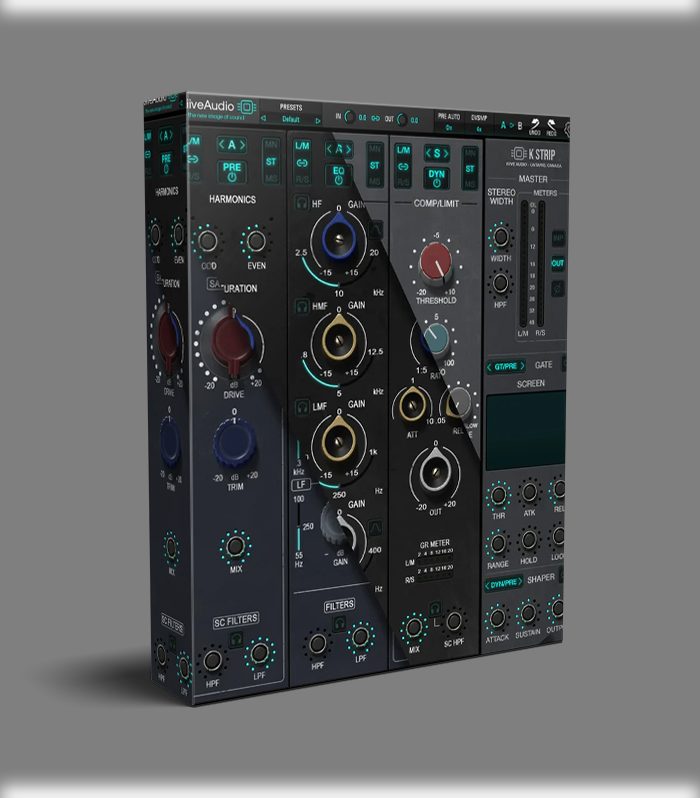
KliveAudio KStrip VST Plugin

Original price was: $99.99.$49.00Current price is: $49.00.
ℹ️ New to ReverBay? Learn how it works →
KliveAudio KStrip VST combines 3 console circuits — preamp, EQ & compression — in one channel strip plugin for PC & Mac.
KliveAudio KStrip VST — Three Console Circuits in One Channel Strip
If you’ve ever wanted the character of three different large-format consoles without buying rack gear or juggling separate plugins for every channel, KliveAudio KStrip VST is worth a close look. This channel strip plugin combines three distinct analog-inspired circuit models — each with its own preamp, EQ, and compressor character — into a single, well-organized interface.
Three Circuits Explained
Preamp / Saturation
- A — Punchy: Forward mids and subtle grit. Works well on drums and electric guitars.
- N — Warm: Rich, smooth harmonic coloring. Flattering on vocals and bass.
- S — Clean: Stays transparent until pushed. Good for acoustic sources.
EQ Section
- A — Musical Punch: Bold boosts that flatter drums and guitars.
- N — Smooth & Broad: Natural curves ideal for sweetening vocals and piano.
- S — Surgical: Tight, precise cuts for shaping problem frequencies.
Compressor
- A — Fast & Punchy: Quick attack that enhances transient snap on drums.
- N — Vintage Glue: Smooth program-dependent leveling for vocals and bass.
- S — Transparent: Tightens dynamics with minimal coloration — ideal for bus work.
🛒 Get KliveAudio KStrip VST
3 Console Circuits · Preamp, EQ & Compression · PC & Mac
Add KStrip VST to CartCompatibility & System Requirements
| Mac | M1/M2 and Intel — native Apple Silicon optimized |
| Windows | Modern 64-bit systems |
| Formats | AAX, AU, VST3 |
Compatible with Pro Tools, Logic Pro, Cubase, Reaper, Studio One, and all major DAWs.
Browse more channel strip and mixing plugins at ReverBay.
Frequently Asked Questions
Can I use different circuits in the EQ and compressor independently?
Yes. The A, N, and S circuits can be selected independently for each section — preamp, EQ, and compressor. You might run the N (warm) preamp with an S (surgical) EQ and an A (punchy) compressor, all within one plugin instance.
Does KStrip work in Pro Tools?
Yes. KStrip supports the AAX format, so it loads directly in Pro Tools on both Mac and Windows alongside AU and VST3 for all other major DAWs.
Is KStrip suitable for mastering as well as mixing?
Yes. The S circuit’s transparent EQ and compression work well on a stereo bus or mastering chain where you need dynamic control without obvious coloration. The N circuit’s smooth curves also work on bus glue applications.
Is it natively optimized for Apple Silicon?
Yes. KStrip is natively optimized for M1 and M2 Macs and also runs on Intel processors. No Rosetta emulation required on Apple Silicon.
What is the difference between the A, N, and S circuits?
Circuit A delivers punchy, forward mids with fast transient response — best for drums, guitars, and anything needing presence. Circuit N is warm and smooth — natural harmonic coloring ideal for vocals, bass, and piano. Circuit S stays clean and transparent until pushed hard — best for acoustic sources or bus work where you want control without added character.
How long does delivery take after purchase?
Your license and installer are delivered by email, typically within a few hours of payment. Our free installing service covers KStrip setup if needed — open a support ticket after purchase.
Still have a question?
Our team handles pre-sales and post-purchase questions. Reach out any time.
Related products
VST Plug-ins

VST Plug-ins
VST Plug-ins

VST Plug-ins
VST Plug-ins

VST Plug-ins
VST Plug-ins

VST Instruments