

VST Reviews
Notonik V2 VST Review: Chord Sounds That Actually Survive the Mix
Sep
Notonik 2 is built for producers who lose ideas while browsing folders. 312 presets, chord tools, free Subs basses, light CPU. Not for deep synth nerds. 8.4/10. Full pack: Notonik V2 on ReverBay.
Introduction: When Chord Sounds Ruin the Mood
Blank session. Drums are knocking. You need chords that don’t sound like a tutorial YouTube pack from 2014. That search — for usable harmony with character — is why beatmakers keep talking about Notonik.
This Notonik V2 VST Review skips the marketing brochure tone. I’ve mixed vocals across hip-hop, pop, and club records long enough to know the difference between “sounds dope solo” and “still works under a hook.” Notonik V2 mostly lands in the second camp. A few caveats below.
What is Notonik V2?
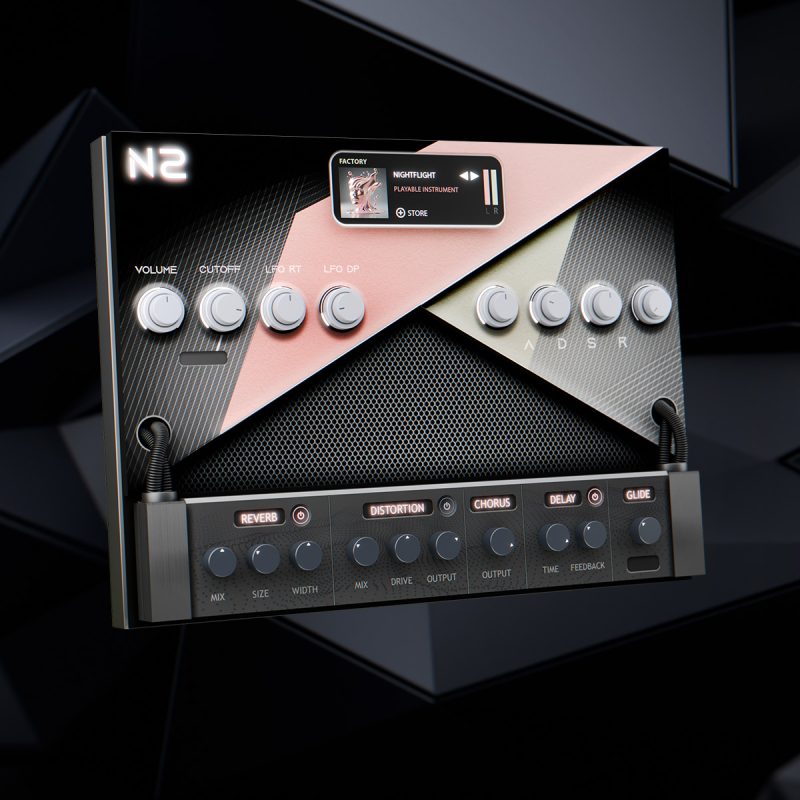
Think of Notonik V2 as a writing instrument first. It’s a chord-focused rompler: sample-based, curated, ready to play. You’re not designing patches in a modular playground — you’re choosing sounds that already have arrangement intent baked in.
The factory set covers 312 Notonik 2 presets: Basses, Pads, Plucks, Synths, Keys, Chord Shots, Chord Progressions, Textures, and related flavors. Formats are VST/VST3/AU for Windows and Mac. More instruments live in our VST plugins section. If you want the instrument plus expansions in one place, use the Notonik V2 VST expansions listing.
First Impressions & Interface
Open it and you’ll notice what isn’t there: clutter. The minimalistic UI keeps you in beat mode instead of “tweak forever” mode. For producers who already lose hours to plugin tourism, that’s a feature.
Storage is the real install conversation. Core library is roughly a 7GB download and about 10GB on disk. You can park the library externally. RAM baseline is 4GB — fine for most session rigs, though I’d still keep buffer settings sane when stacking pads.
Sound Quality & Preset Deep Dive
Where It Hits Hard
Bass presets feel intentional — not generic sine fillers. Chord Shots are the money category for hip-hop: fire one and you’ve got movement that sounds like a producer already processed it. Textures fill intros and transitions without stealing focus from the vocal.
On a trap-soul sketch, I paired a Chord Progression with a dry Notonik bass and only needed light EQ + tape saturation. That’s the test. If a rompler needs five plugins just to sound “finished,” it’s not finished.
Genre Flexibility
Hip-hop and R&B writers will live in Chord Shots and Keys. Pop writers get mileage from Pads and progressions for topline demos. EDM producers can use Textures and Synths for breakdowns that don’t feel pasted from a free sample dump. Across those lanes, Notonik V2 features stay consistent: musical, slightly stylized, rarely lifeless.
Free Subs Plugin
If you want to hear the instrument before buying, start with this Notonik V2 demo on YouTube.
Subs is the free companion with 30 bass tones from the Notonik V2 world. Distortion (Gain linked with Drive), master gain, Chorus, Glide modes (Poly/Mono/Legato), and HP/LP cutoff give you enough tone shaping to audition the brand’s low-end philosophy without buying the full instrument.
Expansion Flavor
Packs like MIRAGES, 24K, BURN, PORTAL, HOSHI DREAMS, ABYSS, and VYBEZ extend the mood map. CHAOS KIT is the drum-forward outlier. Most sound expansions add playable instruments plus progressions — same writing workflow as the core bank.
The Honest Downsides
You’re locked into preset culture. Want infinite wavetable morphing? Wrong tool. Some progressions share a recognizable “Notonik” harmonic fingerprint. The download isn’t tiny. And if you’re hunting a random “Notonik V2 free download,” you’re inviting malware and broken libraries — not a flex.
Performance & Workflow
CPU load stayed friendly while stacking multiple instances in Ableton. FL Studio users should prefer VST3 and keep an eye on buffer size; occasional host quirks get reported with sample-heavy instruments across the board, not just Notonik.
Workflow-wise, this is a sketch accelerator. Progression → bass → bounce loop → build drums. That’s how you protect ideas before they evaporate.
Notonik Chord Rompler vs. Alternatives
Scaler teaches harmony. Captain Chords helps write progressions. Stock pianos are free and forgettable. Notonik competes as a best VST for chord progressions when “good sound out of the box” matters more than theory education.
If your bottleneck is inspiration, Notonik wins. If your bottleneck is learning voicings, buy a theory tool instead.
Pros & Cons
Verdict & Final Score — Notonik V2 VST Review
Buy it if you make beats and need chords/textures that already feel produced.
Skip it if you only enjoy building patches from oscillators and never use factory banks.
Score: 8.4/10. A practical writing tool, not a hype toy.
Tried Notonik V2 on a recent beat? Tell me in the comments which category saved the session.
