

VST Reviews
Loop Elements Pro VST Review: The Best Loop Plugin for Gospel Producers?
Apr
If you’ve spent any time in gospel or worship production circles, you’ve heard the name Loop Elements Pro VST. Built by Gospel Producers over twelve years of active development, Loop Elements Pro VST has become the go-to loop instrument for church musicians, live performers, and studio producers who need something that works — fast, reliably, and without much of a learning curve. But does it hold up in 2025? This review covers everything from the core feature set to actual performance so you can decide whether Loop Elements Pro VST belongs in your setup.
What Is Loop Elements Pro VST?
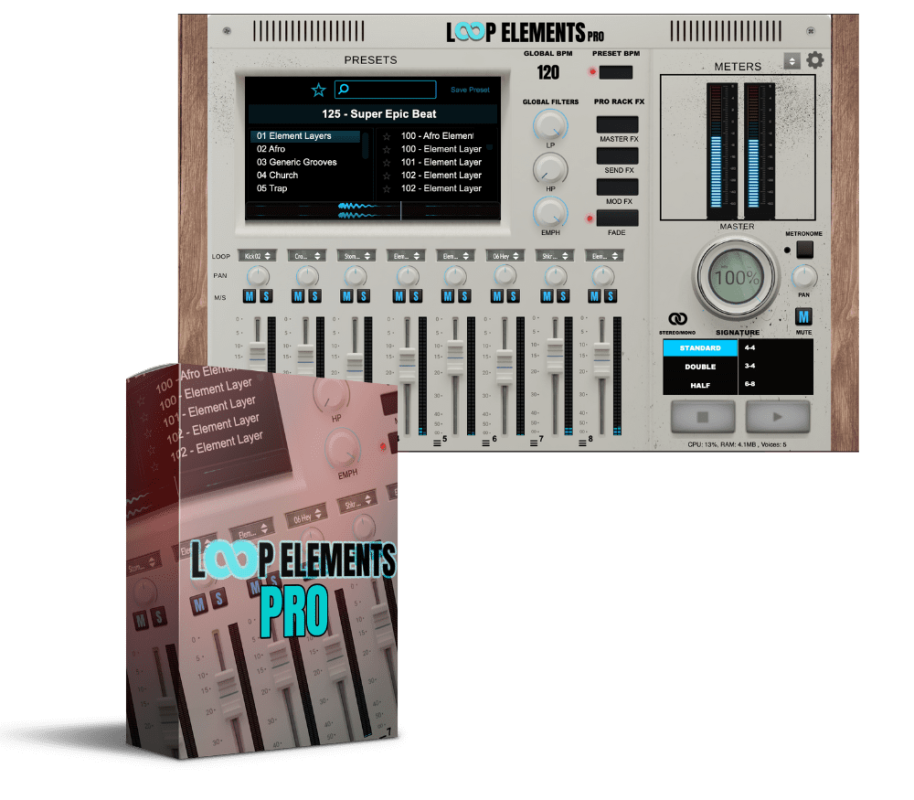
Loop Elements Pro VST is a loop instrument plugin and standalone application developed by Gospel Producers. It ships with the complete Vol. 1–3 and Deluxe loop library, a built-in 8-channel mixer, per-channel effects processing, and over 400 presets covering gospel, R&B, worship, and contemporary Christian styles. The plugin runs as a standalone app on both Mac and Windows — meaning you don’t need a DAW open to use it — and loads as VST3 or AU inside any major DAW on macOS. Windows VST3 plugin support is currently in development.
Version 1.5, the most recent major update, added 75+ new samples including the Smack Claps collection, 150+ new presets, Setlist Mode, Scenes, Fader Linking, MIDI-triggered pattern switching, and a Random Preset button. The update was free for all existing owners — which tells you a lot about how Gospel Producers operates.
Loop Elements Pro VST — Pros and Cons at a Glance
| ✅ Pros | ⚠️ Cons |
|---|---|
| Standalone app — no DAW needed for live use | Windows VST3 plugin still in development |
| 8-channel mixer with per-channel FX | No support for importing custom loops |
| 400+ royalty-free presets included | AAX / Pro Tools support not yet available |
| Setlist Mode for smooth live performance | Library limited to Gospel Producers content only |
| Native Apple Silicon (M1/M2) support | Requires 1280×1024 minimum screen resolution |
| Free updates including v1.5 for existing owners | Niche focus — best suited to gospel/worship genres |
| Vari-8 module prevents loop fatigue | No trial / demo version currently available |
Core Features of Loop Elements Pro VST
Standalone Mode — Loop Elements Pro Without a DAW
The standalone version of Loop Elements Pro VST is its most important feature for live performers. Church musicians often run on a laptop without wanting the overhead of a full DAW session open. Loop Elements Pro launches in seconds, loads your last preset, and is ready before the first song. For many worship musicians, that alone is why they picked Loop Elements Pro over alternatives like Ableton Live with a loop rack.
8-Channel Mixer with Fader Linking
The 8-channel mixer is the core of Loop Elements Pro VST. Each channel runs its own loop independently, with a dedicated fader, mute button, and effects chain. Kick loop on channel 1, pad on channel 2, bass on channel 3, percussion on 4 and 5 — all running at the same time with different FX on each. Fader Linking, added in version 1.5, groups channels under one control when you need to move things together fast. During a live set, that kind of control stops the frantic clicking that breaks focus mid-song.
Vari-8 FX Module — Solving Loop Fatigue
Loop fatigue is real. When a four-bar phrase repeats twenty times without variation, audiences pick up on it — even if they can’t name what’s off. The Vari-8 module in Loop Elements Pro VST fixes this by pushing subtle rhythmic and textural shifts into your loops live, so the same four bars never hit exactly the same way twice. That separates Loop Elements Pro from basic playback tools that just repeat audio on a timer.
Setlist Mode and Scenes
Setlist Mode, introduced in version 1.5, is one of the most practical live performance features in any loop plugin on the market. You pre-load up to 12 loops, arrange them in set order, and assign each a Scene — which stores the exact mix, mute states, and FX configuration you built in rehearsal. Song changes take one click, and everything comes back exactly as you left it. According to Sound On Sound, scene-based recall is one of the defining workflow advantages of modern loop instruments over traditional clip launchers.
400+ Presets and the Royalty-Free Library
Loop Elements Pro VST ships with the complete Vol. 1–3 and Deluxe library from Gospel Producers — every loop cleared for commercial release. The 400+ presets are sorted by genre, mood, and tempo, so finding a slow gospel groove at 68 BPM doesn’t mean scrolling blind. The library leans gospel, R&B, and contemporary worship — a strength if those are your genres, a gap if they aren’t. Expansion packs fill it out further — the Mike B’s Signature Loops expansion adds 50+ loops recorded directly from Mikel Bereal’s MPC2000XL, with a soulful character that sits well alongside the core library.
MIDI Integration and BPM Controls
Version 1.2 added global BPM controls, a Tap Tempo button, and full MIDI controller support including the Korg nanoKONTROL2. MIDI-triggered pattern switching — added in v1.5 — lets you swap loops from a MIDI footswitch or pad without touching the screen. Built-in keyboard shortcuts cut mouse dependency during live sets, which matters when a song changes without warning.
Who Is Loop Elements Pro VST Built For?
Loop Elements Pro VST has a specific audience: gospel and worship musicians who perform live, church music directors who need reliable loops without a complex rig, and studio producers working in gospel, R&B, and contemporary worship who want to sketch ideas fast. It is not a general-purpose loop tool — the library and preset system reflect one creative world, and that specificity is why it works well within that world.
Studio producers outside gospel will still get value from the mixer, FX suite, and Vari-8 module, but the library won’t cover every genre. If you mostly produce trap, EDM, or electronic music, the broader VST plug-ins collection at ReverBay has tools better matched to those styles.
System Requirements for Loop Elements Pro VST
Loop Elements Pro VST Pricing and Value
Loop Elements Pro VST is available at ReverBay for $99.99 — down from $199.99. At that price, the 8-channel mixer, Vari-8 module, Setlist Mode, 400+ presets, the complete Vol. 1–3 and Deluxe library, and free version updates are solid value for any producer working in gospel or worship music. The market for gospel-specific tools is narrow, and Gospel Producers has built the most fully-featured option in that space over twelve years of consistent development.
Verdict — Is Loop Elements Pro VST Worth It?
Twelve years in, Loop Elements Pro VST is the most complete loop instrument built specifically for gospel and worship production. The standalone mode alone makes it worth a serious look for any live musician. Stack on the 8-channel mixer, Vari-8 variation engine, Setlist Mode, 400+ royalty-free presets, and free version updates, and the case at $99.99 is clear. The Windows VST3 and Pro Tools AAX gaps are real limitations — but for the core audience of Mac-based gospel producers and worship musicians, Loop Elements Pro VST covers every front that matters.
🛒 Get Loop Elements Pro VST at ReverBay — 50% Off
Author: ReverBay Editorial Team — music producers and plugin reviewers with 10+ years of experience across gospel, R&B, and electronic production. We test every plugin on active production rigs before writing about it.
Disclaimer: This review is accurate as of April 2025 and reflects Loop Elements Pro VST version 1.5. This article may contain affiliate links — purchasing through ReverBay supports our editorial work at no extra cost to you.
