

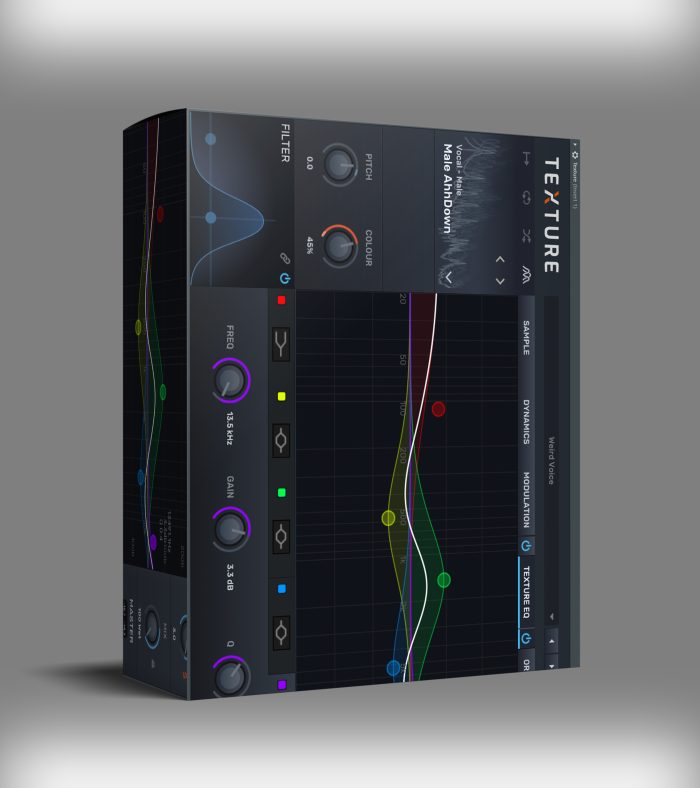
Devious Machines Texture
Original price was: $106.00.$50.00Current price is: $50.00.
ℹ️ New to ReverBay? Learn how it works →
Devious Machines Texture is a revolutionary convolution-based effect plugin that transforms any audio with organic textures, pads, and atmospheres. Save 53% — texture your sound into something extraordinary.
Devious Machines Texture VST Plugin: Creative Sound Layering and Design
A Unique Approach to Audio Enhancement
Buy Now and transform your tracks instantly! Devious Machines Texture VST Plugin delivers pro-grade sound design — now at a steal. Exclusive at ReverBay VST Plugin Shop.
Texture analyzes the dynamics of your input signal and automatically generates new layers in real time — filtered noise to hi-hats, subharmonic content for kick drums, or complex textures from any audio source. The response is based on transient characteristics, making every layer directly tied to what’s happening in your audio.
Core Sound Design Capabilities
- 340+ Integrated Sound Sources — Sampled textures, granular material, foley recordings, ambient atmospheres, noise types, and percussive sounds
- Custom Sample Import via drag-and-drop in 4 playback modes: One-Shot, Granular, Loop, Random
- Envelope Controls — Attack, hold, decay shaping
- Dual Filter System — Sculpt tone and dynamic response
- Independent EQ for both dry and processed signals
- LFOs and Envelope Followers for parameter automation
- Sidechain Filter for precise response shaping
Practical Applications
- Drum Enhancement — Add sub weight to kicks or reinforce transients with noise layers
- Sound Replacement — Generate new drum hits by layering over existing material
- Ambient Textures — Tape hiss, vinyl crackle, environmental noise
- Effect Design — Risers, rhythmic glitches, impacts, transition sounds
- Melodic Textures — Evolving layers that respond to pitched material
Frequently Asked Questions
How does Texture’s real-time layering engine work?
Texture continuously analyzes the transient dynamics of your input signal and uses those characteristics to trigger and shape new sound layers in response. When a drum transient fires, Texture can fire a matching noise burst, sub hit, or textural element at the same moment — all without manual triggering or automation.
Can I import my own audio as a texture source?
Yes. Texture supports drag-and-drop import of your own audio files in four playback modes: One-Shot (triggers on transients), Granular (microsound-level manipulation), Loop (continuous with crossfades), and Random (unpredictable playback patterns). Any audio you import becomes a new texture source within the engine.
What DAWs and formats does Texture support?
Texture supports VST, VST3, AAX, and AU formats on both Windows and macOS, covering all major DAWs including Ableton Live, FL Studio, Logic Pro, Pro Tools, and Studio One.
What is the Granular playback mode?
Granular mode breaks your imported audio into tiny fragments and reassembles them with randomized or controlled grain density, pitch, and position. The result is a shimmering, evolving texture derived from the source audio rather than a direct playback — useful for atmospheric layers, pads, and sound design.
Can Texture replace existing drum sounds or just layer them?
Both. In pure layering mode, Texture adds generated content alongside your existing drum. In sound replacement mode, it can suppress the original and substitute entirely new hits, making it useful for fixing weak drum recordings or creating entirely synthetic drum sounds triggered by live input.
How long does delivery take after purchase?
Your license and download link are delivered by email, typically within a few hours. Our free installing service covers setup if needed — open a support ticket after purchase.
Still have a question?
Our team handles pre-sales and post-purchase questions. Reach out any time.
Related products

VST Plug-ins

VST Plug-ins
VST Plug-ins
VST Plug-ins
VST Plug-ins

VST Plug-ins
VST Plug-ins
VST Plug-ins