

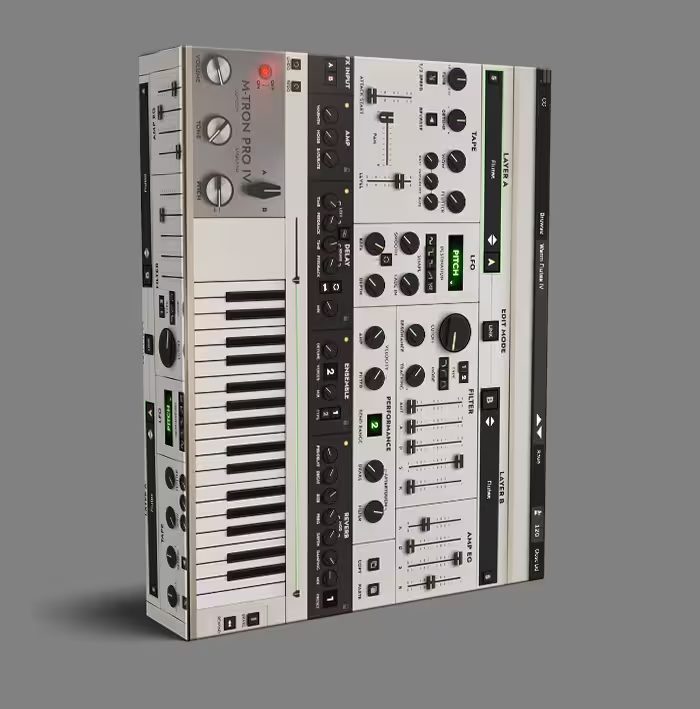
GForce M-Tron Pro IV VST Mellotron Plugin


Original price was: $199.99.$79.99Current price is: $79.99.
ℹ️ New to ReverBay? Learn how it works →
M-Tron Pro IV VST delivers authentic Mellotron sounds with 100+ tape sets, ChamberTron Xtras & modern workflow. Try free demo today!
M-Tron Pro IV VST: The Mellotron That Actually Feels Real
Chasing that iconic, haunting sound that defined progressive rock and psychedelic music? You’ll find it in the M-Tron Pro IV VST from GForce Software. This isn’t just another Mellotron emulation—it’s a virtual instrument that captures every nuance of the original tape replay keyboards. Whether you’re scoring a film, producing a track, or designing sounds, this plugin delivers an authentic playing experience with a workflow that fits right into your DAW. Visit our Blog for more tips on using vintage sounds.
What Makes This Mellotron Plugin Different?
GForce Software spent years analyzing original units, painstakingly sampling every tape frame to preserve the unique character and imperfections that give the Mellotron its magic. Consequently, M-Tron Pro IV doesn’t just sound like a Mellotron—it feels like one. The subtle wow and flutter, the gentle tape hiss, and the distinctive attack are all here, ready to inspire your next composition.
Beyond authenticity, this virtual instrument includes practical features that today’s producers actually need. Imagine having an entire Mellotron library at your fingertips, organized intuitively so you can find that perfect choir, string, or flute sound in seconds. The interface is clean without being sterile, giving you quick access to essential controls while keeping the focus on creativity.
Included Expansions & Sound Libraries
When you get M-Tron Pro IV, you also receive a collection of premium expansions at no extra cost. These include:
- ChamberTron Xtras: Additional chamber sounds for orchestral textures
- OptiTron: Optimized tapes for cleaner, modern productions
- OrchesTron: Orchestral tape sets for film scoring
- The Streetly SFX Console: Sound effects and atmospheric pads
- The Streetly Tapes M300: Classic M300 tape library
- The Streetly Tapes Vol 2, 3, & 4: Expanded tape collections for endless variety
Altogether, these expansions give you hundreds of additional tape sets to work with, making M-Tron Pro IV the most complete Mellotron solution available.
Key Features of M-Tron Pro IV VST
Here’s what you get when you add this virtual instrument to your plugin collection:
- Expanded Sound Library: Over 100 tape sets sourced from original Mellotrons, Chamberlins, and custom tapes you won’t find anywhere else.
- Advanced Tape Controls: Fine-tune the character with parameters for tape age, wear, flutter, and head alignment to dial in anything from pristine to beautifully degraded.
- Modern Effects Rack: Built-in reverb, delay, chorus, and phaser effects tailored specifically for Mellotron sounds, with presets that instantly evoke classic recordings.
- Flexible Output Options: Route individual tape sounds to separate DAW channels for detailed mixing and processing.
- True Legato and Performance Controls: Play expressively with dedicated controls for attack, release, and tape start/stop behavior.
- Preset Management: Hundreds of professionally designed presets, plus the ability to save and organize your own favorites.
How to Import Additional Libraries
Expanding your sound palette with additional libraries and expansions is a simple process that takes just a few minutes. Follow these steps to integrate new tape sets into your collection:
- Load the Plugin
Open your DAW and load M-Tron Pro IV as an instrument on any track. The plugin can also be opened in standalone mode without a DAW for library management. - Click Browse in the Top Menu Bar
At the top of the plugin interface, click the Browse button to open the full Preset and Tape Browser panel where all your sounds are organized. - Click the Folder Icon
On the left side of the browser, just below the GForce logo, locate and click the Folder icon. This action opens the library location manager for adding new directories. - Click the + Sign to Add a Location
When prompted, click the + button to open a file browser dialog. Navigate to the folder containing your libraries or expansions—these can reside on internal drives, external hard drives, or USB storage devices. - Select the Folder and Refresh
Choose the folder with your sound libraries and confirm the selection. Then, click the circular arrows icon (↻) at the top of the browser to refresh the collection. Your newly added banks will now appear in the list. - Restart the Plugin
Close and reopen M-Tron Pro IV within your DAW (or restart the standalone application). This ensures all added libraries are fully indexed and available in the Tape Browser for immediate use.
After completing these steps, your new sound libraries will be fully integrated and ready to use in your productions. The process maintains your original factory presets while seamlessly adding expanded content. Need installation help? Our Free Installing Service can assist you.
M-Tron Pro IV VST: Technical Specifications & Requirements
This virtual instrument is built for compatibility and performance:
- Plugin Formats: VST, AU, AAX (64-bit only)
- System Requirements: macOS 10.13+ or Windows 10+, 4GB RAM minimum (8GB recommended)
- Download Size: Approximately 8GB of high-quality samples
- Copy Protection: iLok (machine activation or dongle), Pace
- Updates: Free updates for the lifetime of version IV
Note: A free demo is available directly from GForce Software so you can test the plugin in your own setup before purchasing.
What Producers Are Saying
Don’t just take our word for it—here’s what producers and composers are saying:
“I’ve tried every Mellotron plugin out there, and M-Tron Pro IV is the only one that captures the unpredictable nature of the original tapes. It’s become essential for my film work.” – Mark, film composer
“The expanded library alone is worth the upgrade. Having all those Chamberlin sounds alongside the classic Mellotrons opens up so many possibilities.” – Sarah, electronic producer
“GForce nailed the workflow. I can find and tweak sounds faster than ever, which means I spend less time browsing and more time creating.” – David, recording engineer
M-Tron Pro IV VST: Frequently Asked Questions
Is M-Tron Pro IV VST compatible with my DAW?
Yes, M-Tron Pro IV comes in VST, AU, and AAX formats, meaning it works with virtually every major digital audio workstation. Whether you use Ableton Live, Logic Pro, Pro Tools, Cubase, or FL Studio, you’ll be able to load it as a standard instrument plugin. The 64-bit requirement ensures optimal performance on modern systems.
How does M-Tron Pro IV differ from previous versions?
M-Tron Pro IV represents a significant leap forward in both sound quality and features. The sample library has been expanded with dozens of new tape sets, including rare Chamberlin sounds. The interface has been redesigned for faster browsing, and new tape manipulation controls let you customize the character more deeply than ever before. If you own an earlier version, upgrade pricing is available from the official website.
Can I use it for live performance?
Absolutely. The plugin includes performance-focused features like true legato, customizable key ranges, and low-latency operation. Many keyboardists use it with a controller in live settings, often mapping controls to hardware knobs for real-time tweaking. For tips on live setup, check out the M-Tron Pro tutorial video.
What kind of support is available?
GForce Software provides excellent customer support, including detailed documentation, video tutorials, and direct email assistance. The plugin also receives regular updates that add new features and compatibility improvements—all free for the life of version IV. There’s an active user community where producers share tips and presets too.
Is there a demo version I can try?
Yes, a fully functional demo is available on the GForce Software website. The demo includes all features and sounds but may have occasional audio dropouts. It’s the perfect way to test M-Tron Pro IV in your own projects before making a decision.
Product Images & Visual Assets
Add these product images with optimized alt text for better SEO:
- Main Interface Screenshot: Alt text: “M-Tron Pro IV VST interface showing tape browser and effects”
- Tape Controls Close-up: Alt text: “Close-up of tape manipulation controls in M-Tron Pro IV VST”
- DAW Integration: Alt text: “M-Tron Pro IV VST loaded in Ableton Live with multiple tape tracks”
- Comparison Image: Alt text: “Vintage Mellotron hardware compared to M-Tron Pro IV VST interface”
- Expansion Libraries: Alt text: “Library browser showing included expansions in M-Tron Pro IV VST”
Additional Resources & Links
For more information about this virtual instrument, check out these resources:
- Official M-Tron Pro IV Product Page – Full specifications and purchase options
- In-depth Video Tutorial – See the plugin in action with professional tips
- KVR Audio User Reviews – Community feedback and ratings
- Official Support Documentation – Manuals and troubleshooting guides
- VI-Control Forum Discussion – Professional user discussions and tips
Browse more virtual instruments and plugins in our Market.
Ready to bring iconic Mellotron sounds to your music? Download the demo or purchase M-Tron Pro IV directly from the GForce Software website. For questions about compatibility or licensing, check our support page or contact their team directly.
Related products
VST Instruments
VST Instruments
VST Instruments
VST Instruments

VST Instruments
VST Instruments
VST Instruments

VST Instruments