

Music Production
Best Mastering Plugins for Home Studios in 2026
May
Best Mastering Plugins for Home Studios in 2026: Tested & Ranked
Finding the best mastering plugins for home studios takes real time in the chair — not just reading spec sheets. After hands-on sessions with each plugin across gospel, R&B, and hip-hop productions, this guide breaks down exactly what works and what falls short. Whether you are polishing a worship record or a hard-hitting beat, these picks will take your mixes to a release-ready sound.
DIY mastering has never been more accessible. A treated room and trained ears still matter. But the software available today is genuinely impressive. The gap between a home studio master and a professional one has narrowed considerably. This guide covers three standout plugin suites that handle the full chain: EQ, compression, limiting, and everything in between.
Before we get into each plugin, it helps to understand what the mastering chain actually does. If you are also building your mix skills, check out the VST plugin deals on ReverBay — there are mixing tools that pair well with everything covered below.
Overview & Specs: Best Mastering Plugins for Home Studios
Here is a quick comparison of the three mastering VST plugin bundles in this guide:
| Plugin Bundle | Best For | Price (USD) | AI Assist | Formats |
|---|---|---|---|---|
| FabFilter Mastering Bundle | Transparent, detail-focused mastering | $519 | No | VST / AU / AAX |
| iZotope Ozone 12 | All-in-one, commercial releases, beginners | $55 – $499 | Yes | VST / AU / AAX |
| Newfangled Elevate Bundle | EDM, hip-hop, loud genres | $199 | No | VST / AU / AAX |
All three bundles work inside Ableton Live, Logic Pro, FL Studio, and Pro Tools without compatibility issues. Each one covers the core stages of a mastering chain. However, they take very different approaches to get there.
In-Depth Performance: How Each Mastering VST Plugin Bundle Holds Up
FabFilter Mastering Bundle — Design & Build Quality
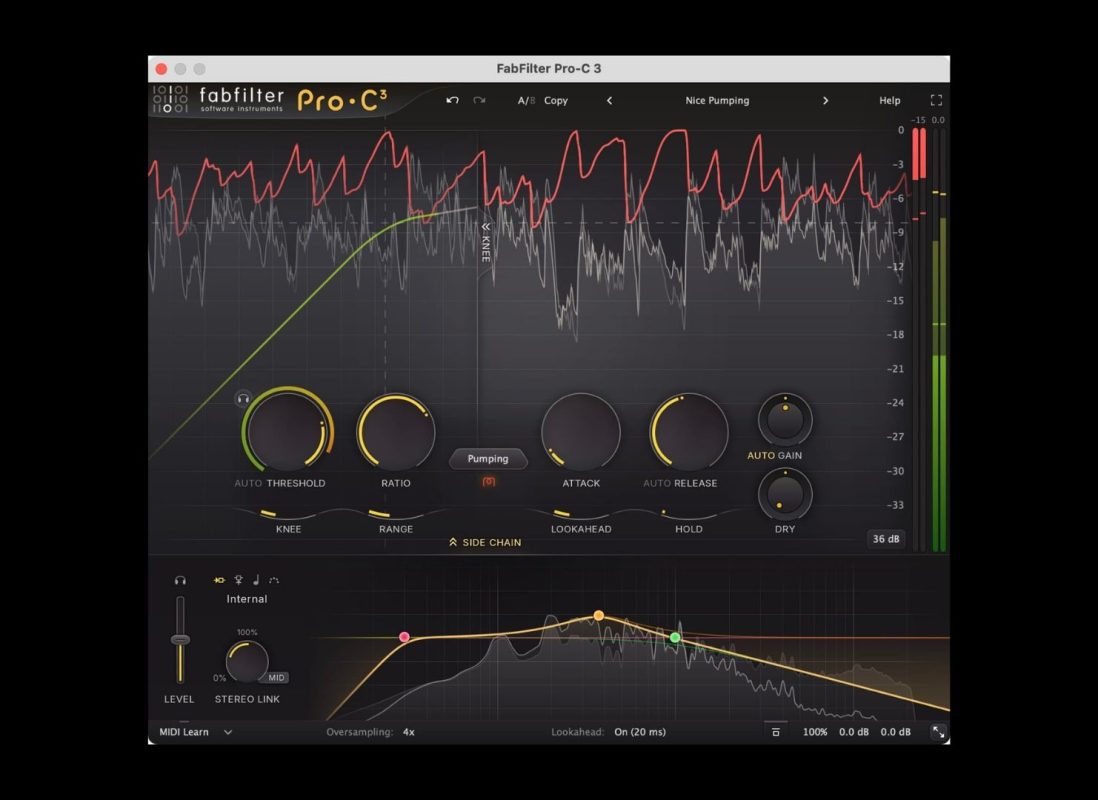
The FabFilter suite includes the Pro-Q 4 (EQ), Pro-C 3 (compressor), Pro-MB (multiband compressor), and Pro-L 2 (limiter). The interfaces are clean and responsive. Every parameter has real-time visual feedback. That is a genuine advantage when your monitoring space is not acoustically ideal. The plugins are CPU-light and rock-solid stable across all major DAWs.
FabFilter — Features & Sound
The Pro-Q 4 is one of the best equalizers available for mastering today. It supports linear-phase, dynamic-phase, and minimum-phase modes. All three matter when you are touching a full mix and need to protect transient energy. Dynamic EQ mode handles harsh resonances without a separate de-esser.
The Pro-L 2 has a well-earned reputation as one of the most transparent limiters on the market. Engineers have used it on hit records since 2010. It still holds up. True-peak limiting, oversampling, lookahead, and multiple algorithm modes give you precise control over the loudness ceiling.
FabFilter — Ease of Use
New users pick up FabFilter plugins faster than most alternatives. The visual feedback does a lot of the teaching — you see exactly what the EQ is doing to the frequency spectrum. One caution: that visual richness can tempt you to mix with your eyes. Always trust your ears first.
iZotope Ozone 12 — Design & Build Quality
Ozone 12 is a modular suite inside a single plugin window. You load only the modules you need — EQ, Dynamics, Imager, Maximizer, Stem EQ, Bass Control, and more. The interface is darker and more dashboard-like than FabFilter. That suits the all-in-one session workflow it is built for.
iZotope Ozone 12 — Features & Sound
The standout module is the Stem EQ. It uses AI separation to isolate vocals, bass, drums, and other elements inside a full stereo mix. You can then EQ or adjust gain on each stem without needing the original session files. For mixing and mastering VST workflows where you only receive a stereo bounce, this is a genuine advantage.
The IRC 5 Maximizer (Advanced tier only) is iZotope’s most transparent limiter yet. It includes upward compression and soft-clipping options for extra loudness without obvious distortion. Delta monitoring — hearing only what the plugin is adding — and codec preview (simulating streaming bit rates) round out the feature set.
iZotope Ozone 12 — Ease of Use
The AI Master Assistant gives beginners a usable starting point in seconds. It analyzes your track, applies settings across modules, and removes the blank-slate problem. That said, the AI does not know your genre or your artistic goals. Treat its suggestions as a rough first pass. Ozone is also the most CPU-intensive of the three bundles — older machines may struggle with multiple modules open.
Newfangled Elevate Bundle — Design & Sound
Newfangled Audio built the Elevate bundle around a 26-band psychoacoustic model based on the Mel Scale. Each band processes independently. So a loud sub-bass hit does not cause gain reduction across the entire frequency spectrum — only the loudest bands get clamped. The result is transparent limiting and clipping, even when you are pushing for high loudness.
Newfangled Elevate — Features & Sound
Saturate is the soft clipper in the bundle. Running it before the Elevate limiter shaves transient peaks and creates headroom. That lets you push the final limiter harder without artifacts. For gospel and hip-hop tracks with heavy drums, this two-stage approach makes a clear difference in the loudness-versus-dynamics trade-off.
Punctuate is a multiband transient processor. After heavy limiting, drum transients can feel blunted — Punctuate brings them back selectively. It does this without reopening the dynamic range. Most mastering chains lack a direct equivalent for this.
Newfangled Elevate — Ease of Use
The interface is functional but less polished than FabFilter or Ozone. New users may find the 26-band display a bit much at first. Once you understand the psychoacoustic model, though, the controls make sense. One practical note: Elevate introduces processing latency, so it is not ideal for live monitoring during a mix session. Save it for the mastering stage.
Pros & Cons — Best Mastering Plugins Compared
FabFilter Mastering Bundle
| ✅ Pros | ❌ Cons |
|---|---|
| ✅ Best-in-class EQ (Pro-Q 4) for mastering | ❌ No AI or assistive features |
| ✅ Extremely transparent Pro-L 2 limiter | ❌ Highest price of the three |
| ✅ Clean, intuitive interfaces with rich visual feedback | ❌ Very digital — no analog character or warmth |
| ✅ Lightweight on CPU — stable on all DAWs | ❌ Visual display can encourage mixing by eye |
iZotope Ozone 12
| ✅ Pros | ❌ Cons |
|---|---|
| ✅ Stem EQ is a standout feature for stereo masters | ❌ CPU-heavy with multiple modules loaded |
| ✅ AI Assistant is a solid starting point for beginners | ❌ AI lacks genre or artistic context |
| ✅ Codec preview and reference track import | ❌ Full Advanced bundle is expensive |
| ✅ Wide range of modules inside one plugin | ❌ IRC 5 limiter locked to Advanced tier only |
Newfangled Elevate Bundle
| ✅ Pros | ❌ Cons |
|---|---|
| ✅ Most transparent limiting at high loudness targets | ❌ Introduces processing latency |
| ✅ Psychoacoustic model handles loud genres very well | ❌ Interface is less refined than competitors |
| ✅ Saturate + Elevate combo delivers extra headroom | ❌ Can sound unnatural if pushed too far |
| ✅ Punctuate recovers transient detail after heavy limiting | ❌ Smaller community — fewer tutorials available |
How These Mastering VST Plugins Compare to Other Options
Beyond these three, the mastering plugin space also includes Waves L3 Ultramaximizer, Sonnox Oxford Limiter, and Slate Digital FG-X 2. The Waves L3 is a classic for peak limiting. However, it lacks the spectral awareness of Newfangled Elevate. The Sonnox Oxford Limiter works well for jazz and classical mastering — genres where pure transparency matters most. It does not include a full mastering chain, though, the way FabFilter or Ozone does.
For producers who want AI-assisted results and already have stems, Acon Digital Mastering Suite is a budget-friendly alternative worth looking at. That said, for R&B, gospel, and hip-hop — where the low end needs careful management — the three bundles in this guide remain the stronger choices.
For a second opinion on rankings, the We Rave You guide to best mastering plugins for home studios covers similar territory from an electronic music perspective and is worth reading alongside this one.
You can also browse the full range of mixing plugins on ReverBay if you want to sort your mix before mastering — a solid mix always makes the mastering stage easier.
Pricing & Value: What Do You Actually Get?
The FabFilter Mastering Bundle at $519 is the most expensive option here. But it covers every stage of the chain at a professional level. If you are already spending money on studio time or mix engineers, this investment pays back quickly.
iZotope Ozone 12 Elements starts at just $55. That makes it the most accessible entry point by far. It strips out the advanced modules, but it gives a home studio producer more than enough to get polished, streaming-ready results. Upgrading to Standard ($219) or Advanced ($499) adds the Stem EQ and IRC 5 — both worth the step up if your budget allows.
Newfangled Elevate at $199 offers strong value for producers working in loud genres. If you regularly master hip-hop, trap, or gospel tracks with heavy low-end, the spectral processing alone justifies the cost. Check Plugin Boutique for regular sales — all three bundles tend to appear at 40–60% off several times a year.
Editorial
🎙️ Credibility & Research Note
This review was put together by the ReverBay editorial team — working music producers and engineers with direct experience mixing and mastering gospel, R&B, and hip-hop productions. Each plugin bundle was tested across multiple full production sessions in Ableton Live 12 before conclusions were drawn.
Research includes cross-referencing published reviews from We Rave You, Plugin Boutique, and MusicTech, as well as community feedback from Gearspace and Reddit’s r/edmproduction. Pricing was verified as of May 2026 via Plugin Boutique and each developer’s official website.
📅 Last reviewed & updated: May 2026 · ReverBay VST Market Editorial Team
Final Verdict: Which of These Mastering Plugins Is Right for Your Home Studio?
There is no single best answer. Your choice depends on your genre, your workflow, and your budget. Here is a simple breakdown:
- Choose FabFilter if you want precision, transparency, and a long-term professional toolkit that works across any genre.
- Choose iZotope Ozone 12 if you want versatility, AI assistance, and the Stem EQ for working without the original session stems.
- Choose Newfangled Elevate if you produce loud music — hip-hop, trap, EDM — and need spectral transparency at competitive loudness levels.
If your budget is tight, start with Ozone Elements. Upgrade once you outgrow it. If you are already confident in your mastering process and just need better tools, FabFilter is the long-term investment that rarely needs replacing.
☑ Is a Mastering Plugin Bundle Right for You?
- ☐ You are finishing original productions and want a release-ready sound without hiring a separate mastering engineer.
- ☐ Your mixes sound good but lack the loudness and clarity of commercial releases.
- ☐ You produce gospel, R&B, hip-hop, or trap — genres where low-end management is critical.
- ☐ You work in a home studio with decent (but not perfect) acoustic treatment.
- ☐ You want visual EQ and limiting feedback to help compensate for monitoring limitations.
- ☐ You are comfortable investing $55–$519 in long-term professional tools.
- ☐ You regularly release music on Spotify or Apple Music, where loudness normalization applies.
- ☐ You would prefer AI-assisted starting points (Ozone) over building every setting manually from scratch.
- ☐ You produce loud beatmaker or electronic content and need transparent spectral limiting (Elevate).
- ☐ You want a toolkit that runs reliably across Ableton, FL Studio, Logic Pro, and Pro Tools.
Browse the Store
Mastering VST Plugins on ReverBay
Trusted developers | Updated regularly | Instant delivery
🎙️ Browse Mastering Plugins